How to Sew in Dressmaker
Mouse versus keyboard, the speed limiter, and keeping 100% on the marching-ants line.
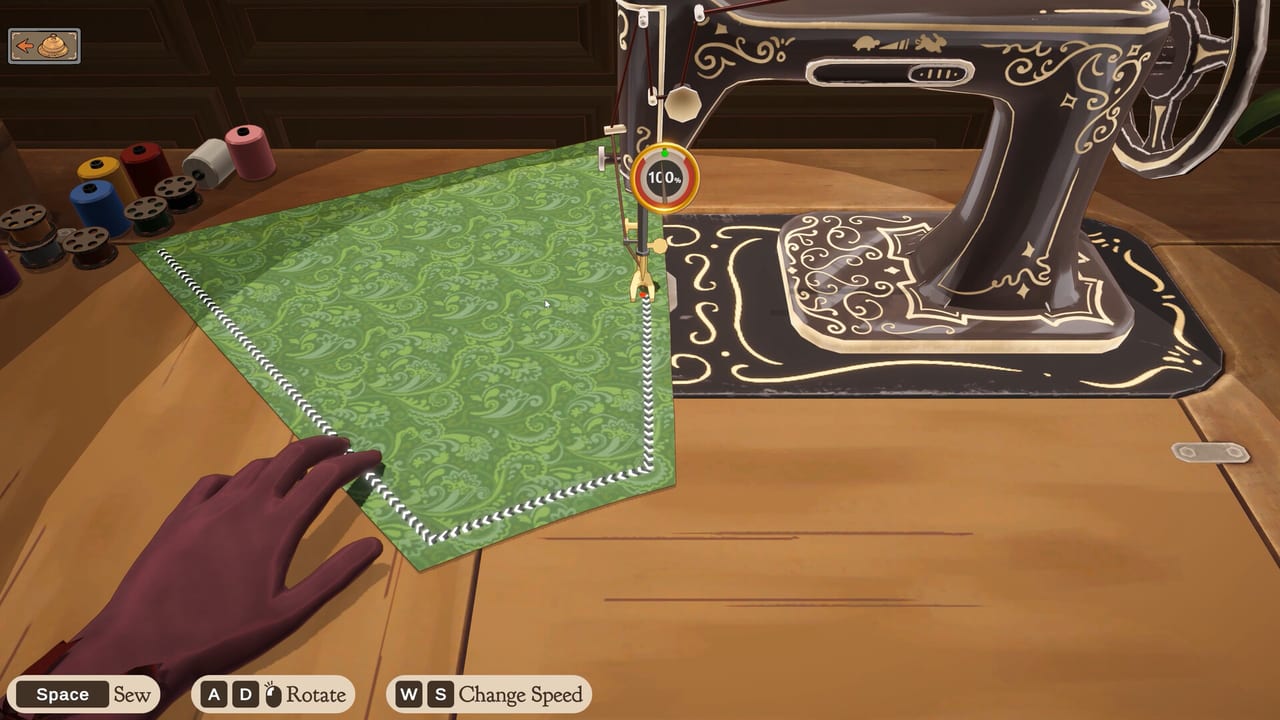
The sewing machine is the station people remember from Dressmaker, and the station that punishes hurry. You have already cut pieces. If those pieces were off grain, stop and read Cutting Patterns first: grain misalignment caps quality even when this page is followed perfectly. If the pattern is green-outlined and packed, this page is how you stitch it without watching 100% collapse.
The machine shows a dotted, marching-ants seam path and a red follow-dot. Your job is to keep that dot on the path. Construction quality is scored continuously. Drift off the line and the number falls fast. There is no late-game stat that forgives a wild corner. Accessories will not hide a 30% seam.
Mouse drag versus Space and arrows
Two control schemes are first-class.
Mouse: click and drag to push fabric through the machine. You are steering angle and feeding speed with one motion. It feels close to moving cloth under a real foot. It is also the scheme that punishes shaky hands, high mouse acceleration, and tiny laptop trackpads.
Keyboard: Space starts and stops the sew. Arrow keys steer. This is the cleaner precision option for long straight skirt seams and for anyone who wants discrete taps instead of a held drag. You can mix schemes between seams. Pick the one that keeps the red dot calmer, not the one that looks more impressive.
The full key list sits on keyboard and mouse controls. Read that page once, then come back here for scoring behaviour.
Pause, release, and momentum
Release the drag or tap Space to pause. Pausing is free. Sewing off-line is not. Treat corners as pause points. Feed a straight, pause, rotate, feed the next straight. The machine has momentum. If you yank the fabric at speed, the dot overshoots the curve and quality is already gone before you react.
There is a speed limiter on purpose. You cannot brute-force a ruffle by going faster than the line. Pushing into the limiter on a long straight is fine. Pushing into it on a sleeve cap is how a dress dies. If the fabric feels like it is running away, you are feeding too hard, not too weakly.
100% versus restart
Start a seam at 100% and protect it. A small wobble is recoverable if you pause immediately and re-enter the line. A long scrape off-path is not. Restart that seam. The prototype will let you live with an ugly number; the score will not pretend it is couture. Do not sew the remaining pieces “to see.” You already know the cap.
Light fabrics make the marching-ants line harder to read. Increase contrast if the UI allows it, tilt your display, or slow down until the red dot is the only thing you track. Dark wool hides the line less often than pale cotton. If you keep losing pale seams, the problem is visibility, not talent.
Twitchy hands, fatigue, and assist
If your hands shake, skip the mouse for curves. Space plus arrows turns the problem into tapping, which many players can hold longer. Rest between seams. The shop is single-player and untimed in the sense that no second player is waiting on a shared machine; the client brief does not require you to sew in one heroic take.
For the Steam shop planned on 21 September 2026, the team has described a Sewing Assist option: hold Space and let the machine attempt the turns. That toggle is a full-game accessibility note, not something to hunt as a finished prototype feature. Until then, keyboard steering is the practical workaround.
Linux prototype users have reported uncapped frame rates that make feeding feel twitchier. Cap FPS in the driver or a wrapper if the machine surges. That is a prototype roughness, not a skill issue.
How sewing sits in the loop
Sew only after cutting. Sew before accessories. If you are lost on station order, return to How to Play. After a failed delivery, run the quality checklist in this order: grain outline, stitch line, style tags, budget. Most “I sewed fine” complaints die on step one or two.
A useful practise drill in Prototype 0.5.5: take leftover cotton, cut one long rectangle-friendly piece on grain, and sew only that seam until you can pause at corners without dipping below a number you like. Then return to a real commission. The library client at ~300 coin, covered in Customers and Commissions, will wait for a clean professional stitch more than they will wait for a dramatic flourish.
When a pale silk finally appears on a ball brief, drop speed again. Expensive cloth does not sew itself. The red dot does not care that the bolt cost most of the purse. Keep it on the ants until the last millimetre, then go decorate.
Frequently Asked Questions
Quick answers for launch week, the prototype, and the sewing loop.
Should I use the mouse or the keyboard to sew?
Use whichever keeps the red follow-dot on the line. Mouse drag is tactile. Space plus arrows is steadier for many players. See controls for the mapping.
Why does quality crash even when I finish the seam?
Quality is live. Off-line travel drops it immediately. Restart the seam rather than finishing a bad path. Confirm grain first in Cutting Patterns.
Can I sew faster on long skirt seams?
A little, until the speed limiter. Straights tolerate more feed than curves. If momentum throws the dot wide, you are already too fast.
The stitch line vanishes on light fabric. What helps?
Track the red follow-dot, not the cloth print. Slow down, pause at corners, and raise contrast if you can. Pale cotton is harder to read than dark wool.
Is there an assist for shaky hands?
In Prototype 0.5.5, switch to Space plus arrows. The team has described a Sewing Assist toggle for the Steam version. Until 21 September 2026, keyboard steering is the workaround.
When should I stop sewing and recut?
If the outline was never green, recut. If the outline was green and only the stitch failed, restart the seam. The quality checklist and How to Play keep those cases separate.