Dressmaker Controls
Mouse, keyboard, rotation, and the speed limiter that saves silk hems.
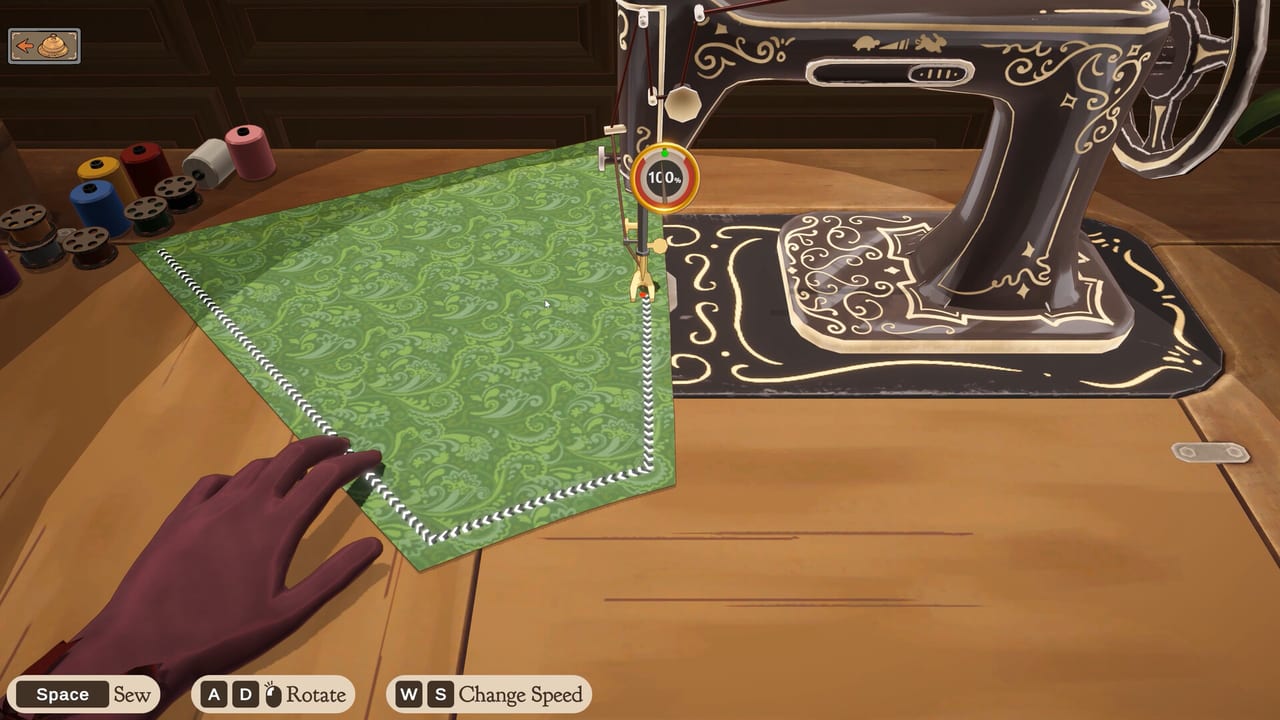
Dressmaker’s hands-on loop is the point of the game. You do not tap a “craft dress” button. You drag cloth through a sewing machine, rotate pattern pieces on the cutting table, and decide how fast the needle runs. This page is the input map for Prototype 0.5.5 and for the Steam options already listed on the store: mouse-only play, playable without timed input, and custom volume. Pair it with how to play for the shop loop and with sewing for stitch quality.
Nothing here is a hidden combo list. If an input feels sticky, slow down before you remap your brain. Most “broken sewing” reports are speed and grain, not missing keys.
Sewing: mouse click-drag
The default sew is click and drag. Grab the piece, feed it along the marching-ants guide, and keep the seam allowance honest. Dragging faster than the limiter allows will wander off the line. Dragging too far from the presser foot will drop the stitch. If you use a trackpad, shorten your strokes; long laptop swipes overshoot curves.
Mouse-drag is also the friendliest way to place buttons and to pin lace trim. The accessories page warns that lace in v0.5+ can glitch if you whip the cursor. Short clicks beat heroic sweeps.
Steam lists a mouse-only option. Treat that as the accessibility promise for the full Windows and macOS build. In the prototype, you can already complete a dress without touching the keyboard if you are patient on the machine and the table.
Sewing: Space plus arrows
Keyboard assist is Space to start and stop the machine. Current Steam screenshots also label A/D to rotate the piece and W/S to change speed. Prototype write-ups often mention arrow keys to walk the cloth; if your build shows WASD on the sewing HUD, trust the on-screen prompt over an older article. Use this when a long straight seam makes your wrist complain, or when you want a metronome instead of a drag. Start the run with Space, nudge with arrows, and Space again to stop before a corner. Turning a corner at full run is how silk puckers.
You can mix modes on one garment: arrows on a long skirt seam, mouse on a sleeve cap. The game does not punish mixing. It punishes panic.
Cutting table: rotate, then cut
Pattern pieces must sit on grain or bias on purpose. Rotate each piece on the cutting table until the grain arrows match the job. Wait for a green outline before you cut. The cutting guide explains why library cotton wants grain and evening silk often wants bias. This page only cares that rotation is a first-class control, not an optional flourish.
If a piece will not go green, you are probably overlapping the bolt edge or fighting another piece. Nudge, rotate again, and only then cut. Scissors do not undo a bad angle.
Speed limiter
The speed limiter is the control players skip and then blame the fabric. High speed is for long cotton straights you already trust. Low speed is for curves, silk, velvet, and any lace-adjacent seam. If the store’s “playable without timed input” flag matters to you, play with the limiter low enough that the machine never feels like a rhythm game. Dressmaker is not a QTE title. You can take ten seconds on a dart.
A practical limiter habit:
- Cotton everyday seams: medium.
- Wool darts and princess seams: low-medium.
- Silk and velvet: low.
- Anything near lace pins: lowest, then mouse for the trim itself.
If a score still tanks, the limiter was not the only issue. Open the quality checklist and inspect grain before you blame the keybinds.
Volume, comfort, and shop noise
Steam lists custom volume controls. Use them. The machine, the shop, and the soundtrack should never drown a tutorial line you still need. Prototype 0.5.5 already teaches with on-screen prompts; keep those readable. There is no competitive voice chat. This is a single-player shop. Set the mix so you can hear the needle without flinching.
Suggested bindings in your hands, not in a config file
Dressmaker does not ask you to build a 40-key overlay. Remember four jobs:
| Job | Input |
|---|---|
| Feed cloth | Mouse click-drag |
| Start / stop needle | Space |
| Nudge cloth | Arrow keys |
| Sit a pattern true | Rotate on the cutting table |
Everything else is camera, menus, and placing notions. If you are on a laptop, plug in a mouse before an opera hem. If you have tremor or fatigue, lower the limiter and use Space on long seams. If you want zero keyboard, stay on click-drag and take the extra minute.
Prototype versus Steam input promises
Prototype 0.5.5 is the build you can download today from itch.io. It taught the world click-drag sewing. The Steam page for 21 September 2026 adds explicit accessibility language: mouse-only, no timed input required, custom volume. Do not tell a friend the prototype “is missing” those Steam flags until you have checked the in-game menus; some comfort options exist early, some are store copy for the full app.
Mac players still need the Open Anyway dance for the unsigned prototype zip; that is not a control issue, it is Gatekeeper. Steps live on prototype notes. The Steam app should install like any other notarized title on Apple Silicon.
When a new player asks “what do I press?”, send them this table, then how to play for the shop, then sewing for the ants line. Inputs are small. The craft is not. Keep the limiter honest and the rotation green, and the rest of the Tools Hub is just confirmation that your PC and your delivery ritual can keep up.
Frequently Asked Questions
Quick answers for launch week, the prototype, and the sewing loop.
Can I play Dressmaker with only a mouse?
Yes. Steam lists a mouse-only option, and the prototype already lets you click-drag sew and place notions. Take extra time on curves.
What does Space do at the sewing machine?
Space starts and stops the needle. Use arrow keys to walk the cloth, and stop before corners so silk does not pucker.
Is Dressmaker a timed reaction game?
No. Steam lists playable without timed input. Lower the speed limiter if the machine feels like a rhythm challenge.
How do I rotate pattern pieces?
On the cutting table, rotate until grain arrows match the job and the outline turns green. See the cutting guide.
Trackpad or mouse for lace?
Mouse. Prototype lace trim is fussy. Short clicks and a steady pointer beat trackpad swipes. More on accessories.
Where do I go after I learn the keys?
Sew a cotton test with the sewing guide, then run the quality checklist before any luxury bolt.